Connect any MCP-compatible AI assistant to SeekOut in minutes and start searching talent, reviewing your pipeline, and taking action from chat.
If you have a SeekOut Recruit license, MCP access is already included — there's nothing extra to buy. On a self-service assistant like Claude, you can be running your first search in about five minutes.
Prerequisites
A SeekOut Recruit license (MCP access is included — no upgrade needed)
An MCP-compatible AI assistant: Claude (all tiers), ChatGPT, Gemini Enterprise, Microsoft 365 Copilot, Amazon Quick Enterprise, or a desktop app like Claude Desktop, Cursor, or VS Code
Enterprise-managed platforms (Gemini Enterprise, Microsoft Copilot) may require an administrator to provision the connector before individual users can connect.
Connect in Four Steps
1
Choose your AI assistant
Pick any supported assistant. You can connect more than one — each uses your same SeekOut account and permissions.
2
Add the SeekOut MCP connector
Use the MCP Server URL when adding the connector:
https://seekout-search-mcp.seekout.io/tools
For desktop apps, add this to your MCP config file instead:
The first time your assistant calls a SeekOut tool, you'll be prompted to sign in. OAuth handles authentication automatically — API keys are only needed for automated, non-interactive environments.
4
Run your first search
Ask in plain English. Any of these is a great first prompt:
Find senior product managers in Seattle with fintech experience.
How many ML engineers are available in Austin vs. Denver vs. Chicago?
Pick Your Assistant
Each assistant has a short, dedicated setup guide:
Once you're connected, try these. Each maps to a guided workflow — copy the prompt, change the variables, and use the follow-up to refine.
Analysis & Intelligence01 / 05
Analyze Talent Markets
Use case · Hiring Manager Reset
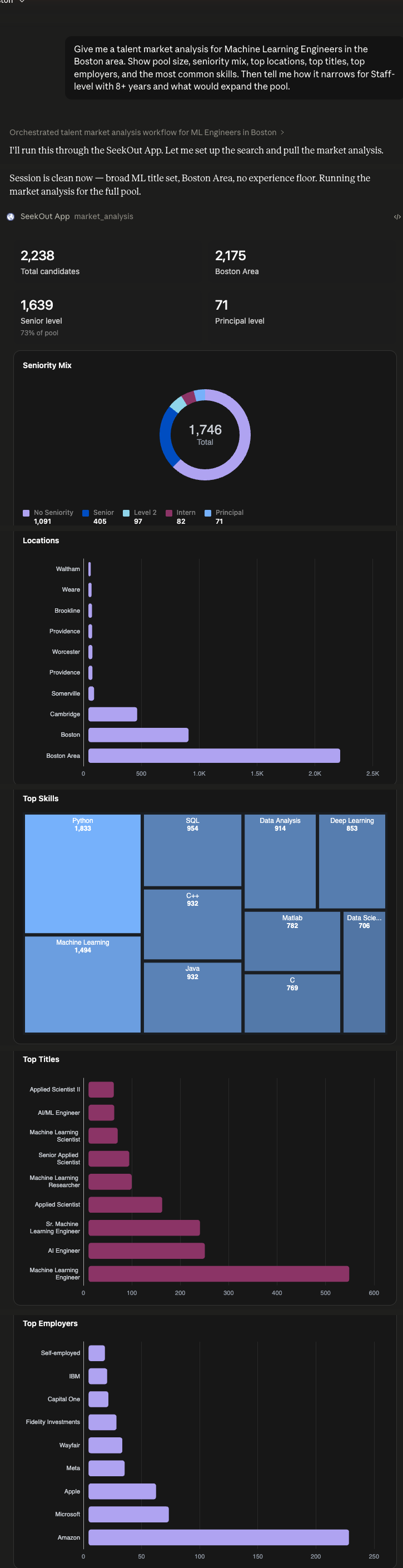
Give me a talent market analysis for Staff ML Engineer in Boston with 8+ years. Show pool size, top employers, common skills, and which requirements are narrowing the field. Tell me what would expand the pool if we need to broaden the spec.
Then try · Compare Boston with Seattle and Austin at the relaxed spec. Where does the supply widen most?
Real result in Claude — market dashboard: pool size, seniority mix, locations, top titles, employers & skills. Click to enlarge.
Weeks of stalled req → market truth in one chatBest for TA Leaders, Hiring Managers
Search & Discovery02 / 05
Source Across Pools
Use case · Cross-Pool Shortlist Build
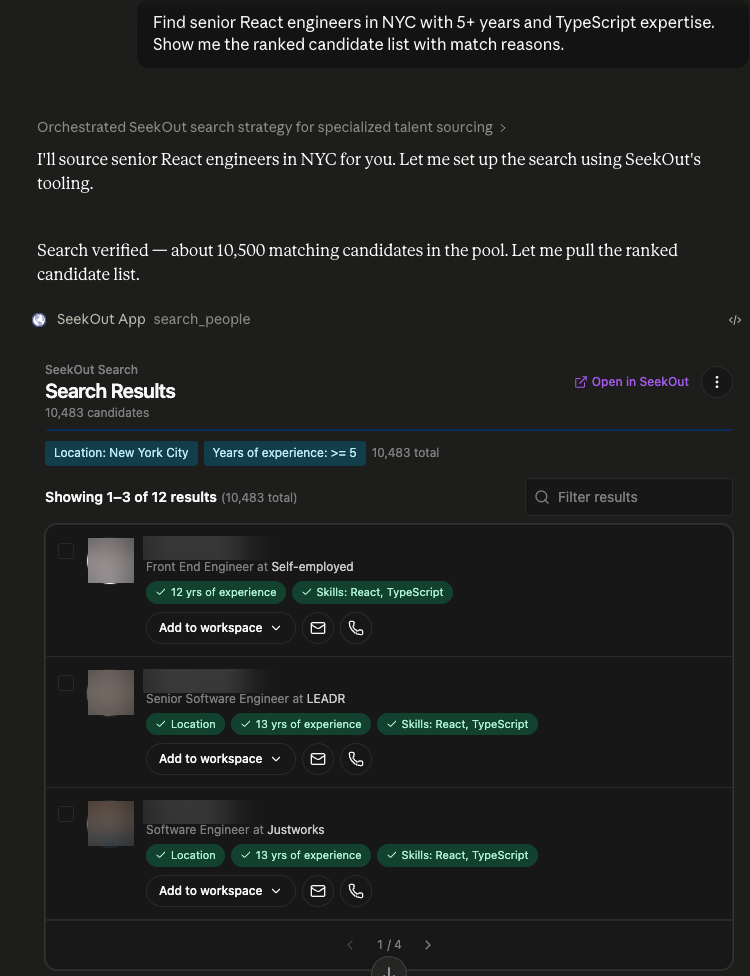
Find senior React engineers in NYC with 5+ years and TypeScript expertise — one ranked list with match reasons. If our ATS is connected, fold in anyone already in our pipeline too.
Then try · Show me the top 10 with a one-line summary of what makes each strong.
Real result in Claude — ranked candidate shortlist with match reasons and one-click actions. Click to enlarge.
Minutes, not MondayBest for Sourcers, Full-cycle Recruiters
Outreach & Messaging03 / 05
Reach Out
Use case · Personalized Candidate Outreach
Draft warm outreach to the top React candidate. Reference one real detail from their background, keep it senior-IC in tone, and give me a couple of angles to choose from — show me the draft before any send.
Then try · Tighten it to three sentences, and draft a short LinkedIn InMail version too.
Real result in Claude — a personalized outreach email (two angles), grounded in the candidate’s profile and ready to open in your mail client. Click to enlarge.
From shortlist to sentBest for Sourcers, Full-cycle Recruiters
Evaluation & Hiring04 / 05
Assess Candidates
Use case · Candidate Fit Assessment
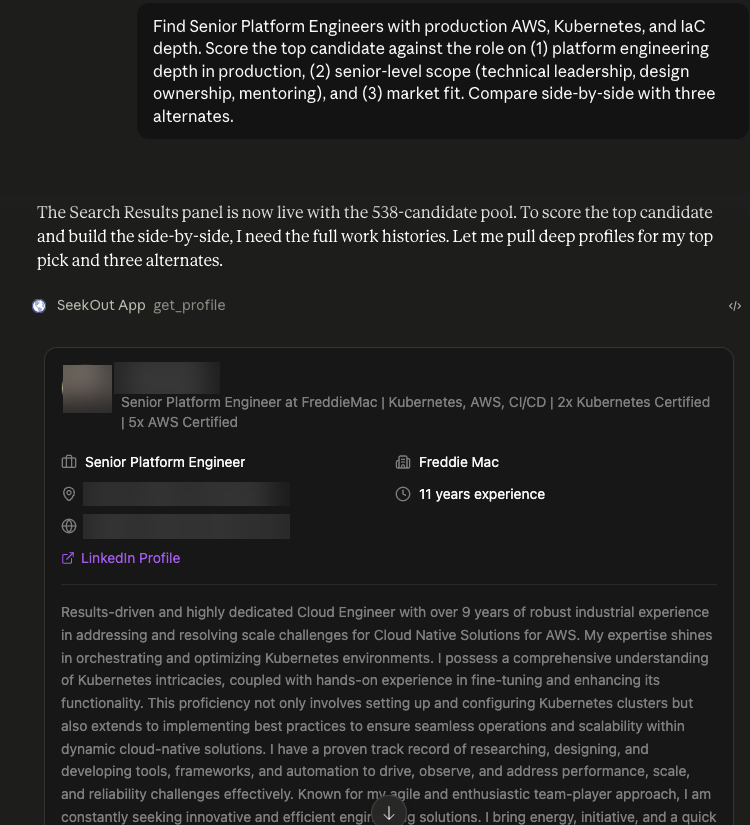
Score the top candidate against our Senior Platform Engineer role on (1) platform depth in production (AWS, Kubernetes, IaC), (2) senior-level scope, (3) market fit. Compare side-by-side with three alternates.
Then try · Re-run at the 8–15-year band and prioritise anyone with explicit search-infrastructure or vector-DB experience. Compare to today's top 4.
Real result in Claude — candidate profile scored against the role for a side-by-side comparison. Click to enlarge.
POV in minutesBest for Full-cycle Recruiters, TA Leaders
Action & Export05 / 05
Activate Shortlists
Use case · Outreach-Ready Workflow
Take action on the top 3 from our React shortlist. Verify contacts and save them to a new workspace called Senior React — NYC Q2 2026 so they’re ready for outreach.
Then try · Export the saved shortlist to a sheet I can share with the hiring manager.
Real result in Claude — act right on the results: verified contacts and a one-click save to the “Senior React — NYC Q2 2026” workspace. Click to enlarge.
Loop closed in one chatBest for Full-cycle Recruiters, Sourcers